

Is Shopify Flow right for your store?
Shopify Flow excels at offering comprehensive automation features for ecommerce, but it is primarily useful for stores eager to integrate various systems seamlessly.
- Choose it if
- you want to automate complex workflows and connect multiple apps.
- Standout capability
- Easy integration with popular apps like Slack and Google Sheets for streamlined operations.
- Consider another approach if
- you require more advanced or niche automation features not supported by the templates.
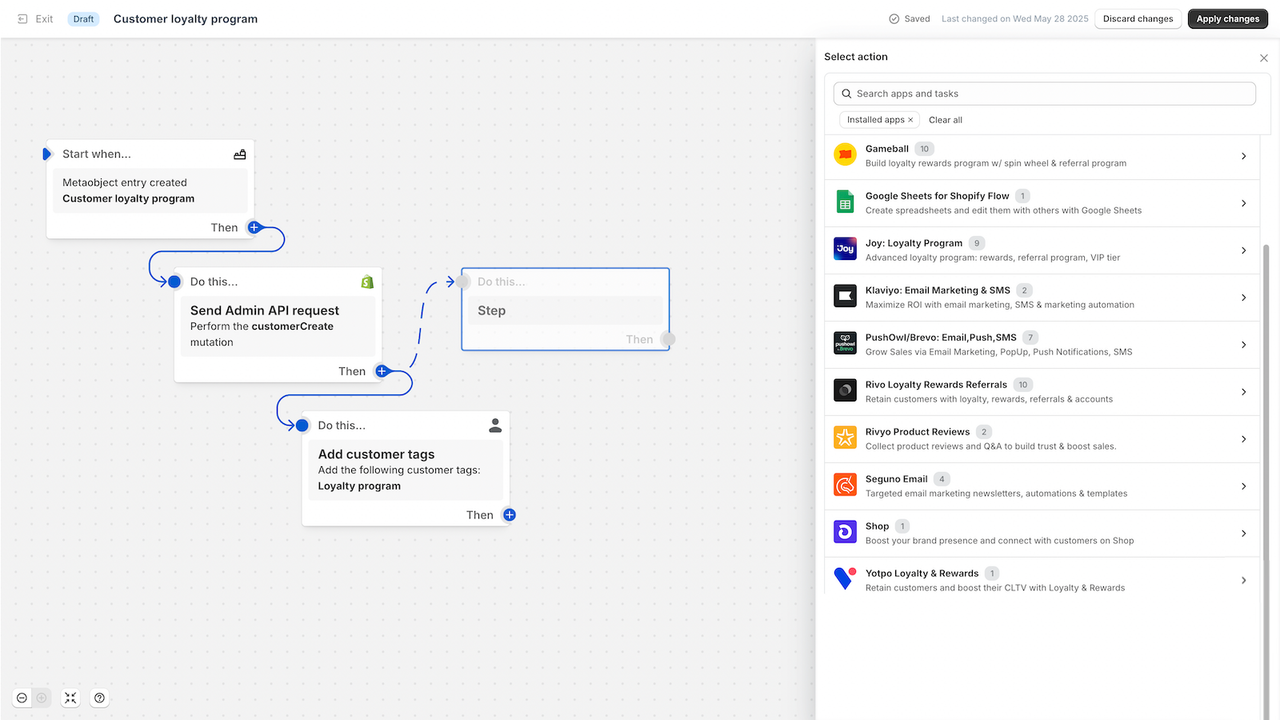
Shopify Flow is a powerful automation and integration platform tailored for ecommerce operations. It enables merchants to create custom workflows that automate critical tasks including marketing, order fulfillment, inventory management, and fraud prevention. Users can boost productivity and save time by establishing automatic processes that connect various apps and services. The platform supports a wide range of automation templates allowing for custom logic and unlimited actions, designed to meet the unique needs of ecommerce businesses. With its intuitive interface, merchants can streamline their operations and focus on growing their store.
Pros
- Easy integration with popular apps like Slack and Google Sheets for streamlined operations.
- A wide variety of customizable automation templates for diverse ecommerce needs.
- Robust features for automating multiple aspects of store management, increasing efficiency and productivity.
Cons & limitations
- Some advanced automation features may be limited to specific templates or require additional apps, affecting users who want custom solutions.
- Real-time analytics and detailed reporting capabilities may be lacking, which could impact data-driven decision-making for some merchants.
- Certain integrations may require additional subscriptions or paid plans, impacting overall costs for advanced functionalities.
Features
- Automated marketing workflows
- Order fulfillment automation
- Inventory management tasks
- Fraud detection mechanisms
- Customizable email campaigns
What you can do with Shopify Flow
Automated Marketing Campaigns
Create customized email marketing campaigns that automatically target customer segments based on their behaviors, improving engagement and conversion rates.
Order Management Automation
Streamline order processing by automating tasks such as tagging, updating inventory, and notifying team members, helping minimize human error and enhancing efficiency.
Fraud Detection Automation
Automatically identify and flag potential fraud by setting up workflows that monitor unusual order patterns, ensuring security and trust with your customers.
Pricing & plan limits
- No additional charges for automated workflows.
- Access to premium features may require other applications or plans.
Setup & day-to-day use
- Install the Shopify Flow app from the Shopify App Store.
- Connect external services such as Google Sheets and Slack in your settings.
- Select existing templates or create custom workflows based on your business needs.
Supported integrations
- Slack
- Google Sheets
- Asana
- Klaviyo
- Trello
Questions about Shopify Flow
What can I automate with Shopify Flow?
You can automate marketing tasks, order fulfillment, fraud detection, inventory management, and more.
Do I need technical skills to use Shopify Flow?
No, Shopify Flow is designed to be user-friendly and intuitive for all merchants.
Can I integrate other apps with Shopify Flow?
Yes, Shopify Flow integrates with various apps like Slack and Google Sheets.
Is there a limit to how many automations I can create?
While you can create many automations, there are limits on specific templates and integrations based on the plan.
What support is available if I need help?
Shopify provides resources through the Help Center and community forums for any assistance needed.
Compare pricing plans
| Plan | Monthly | Annual | Limits & charges |
|---|---|---|---|
| Free Plan | Free | Not documented | Monthly
|
Changes in our research
Differences between saved listing checks. A newly recorded detail can reflect better research rather than a product change.
Checked 3 Nov 2026
- Listed features
- Previously: Automate marketing workflows; Integrate with external applications; Custom workflow creation; Order fulfillment automation; Inventory management automationNow: Automated marketing workflows; Order fulfillment automation; Inventory management tasks; Fraud detection mechanisms; Customizable email campaigns
- Listed integrations
- Previously: Slack, Google Sheets, AsanaNow: Slack, Google Sheets, Asana, Klaviyo, Trello
Checked 1 Nov 2026
- Listed features
- Previously: Build custom workflows; Automate marketing tasks; Streamline order fulfillment; Integrate with popular apps; Use hundreds of workflow templatesNow: Automate marketing workflows; Integrate with external applications; Custom workflow creation; Order fulfillment automation; Inventory management automation
- Listed integrations
- Previously: Slack, Google Sheets, Klaviyo, Asana, TrelloNow: Slack, Google Sheets, Asana
Checked 30 Oct 2026
- Listed features
- Previously: Trigger workflows from store or app events; Branch logic with conditions; Run actions on Shopify records; Send emails and HTTP requests; Use workflow templates or build custom flows; Connect with Slack, Google Sheets, and other appsNow: Build custom workflows; Automate marketing tasks; Streamline order fulfillment; Integrate with popular apps; Use hundreds of workflow templates
- Listed integrations
- Previously: Shopify Admin, Asana, Email, Google Sheets, Klaviyo, Slack, TrelloNow: Slack, Google Sheets, Klaviyo, Asana, Trello