

Is Stockroom right for your store?
Stockroom offers extensive inventory features but requires a strong initial setup for optimal usage.
- Choose it if
- You need a complete system for handling inventory and purchase orders.
- Standout capability
- Unlimited purchase orders streamline inventory processes.
- Consider another approach if
- You prefer a simpler setup or have low inventory needs.
Stockroom is a comprehensive system designed for purchasing, inventory management, and manufacturing. It allows users to build unlimited purchase orders directly from their catalog and manage suppliers effortlessly. Users can email purchase orders as PDFs, send them to multiple locations, and manage stock adjustments with an audit trail. The app supports counting stock, transferring items, and printing labels, making it essential for efficient inventory control. Additionally, Stockroom provides reports on COGS and dead stock, enabling businesses to track their performance accurately.
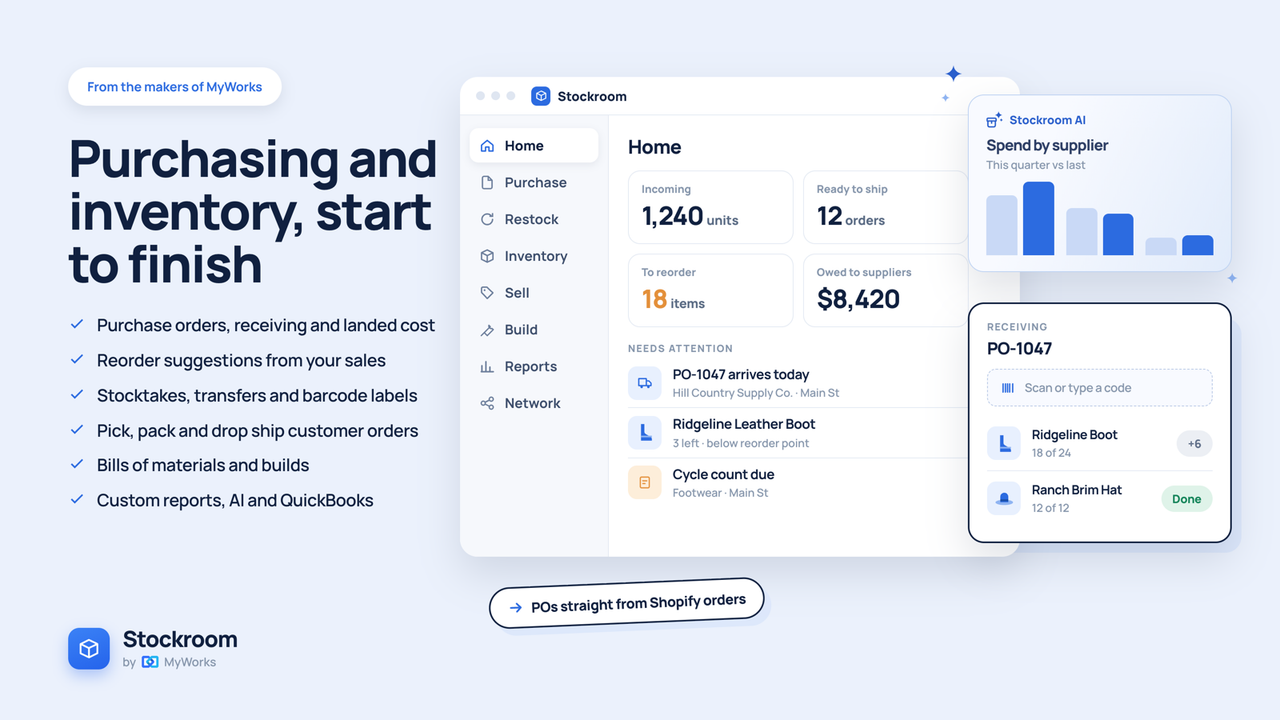
Pros
- Unlimited purchase orders streamline inventory processes.
- Robust reporting on COGS helps identify dead stock.
- Emailing POs enhances communication with suppliers.
- Seamless syncing with QuickBooks and Xero improves account management.
Cons & limitations
- Requires careful setup for effective use, which may be challenging for small businesses.
- Reporting features may have a learning curve, impacting operational efficiency initially.
Features
- Unlimited purchase orders
- Inventory management
- Forecasting capabilities
- Email purchase orders as PDFs
- Track landed costs
What you can do with Stockroom
Generating Purchase Orders
Create purchase orders from your product catalog, allowing for quick ordering and better organization.
Inventory Management
Count and adjust inventory levels with an audit trail, ensuring accurate stock records.
Reporting on Costs
Utilize reports to analyze costs of goods sold and dead stock to drive better purchasing decisions.
Supported integrations
- QuickBooks Online
- QuickBooks Desktop
- Xero
Questions about Stockroom
What type of orders can I manage with Stockroom?
You can manage unlimited purchase orders and suppliers.
How does Stockroom help with inventory tracking?
Stockroom allows for counting stock with team collaboration and audit trails.
Can I synchronize Stockroom with my accounting software?
Yes, it integrates with QuickBooks and Xero for seamless accounting.
Compare pricing plans
| Plan | Monthly | Annual | Limits & charges |
|---|---|---|---|
| Free | Free | Not documented | Monthly |
Changes in our research
Differences between saved listing checks. A newly recorded detail can reflect better research rather than a product change.
Checked 4 Nov 2026
- Listed features
- Previously: Unlimited purchase orders; Inventory management; Sync with QuickBooks and Xero; Custom reports; Stock alertsNow: Unlimited purchase orders; Inventory management; Forecasting capabilities; Email purchase orders as PDFs; Track landed costs
- Listed integrations
- Previously: QuickBooks Desktop (MyWorks), QuickBooks Online (MyWorks), Xero (MyWorks)Now: QuickBooks Online, QuickBooks Desktop, Xero
Checked 1 Nov 2026
- Listed features
- Previously: Unlimited purchase orders and suppliers; Build purchase orders from your catalog and email them as PDFs; Send one purchase order to multiple locations; Receive stock in full or in part; Return stock for credit; Count stock with your team; Adjust inventory with an audit trail; Transfer stock; Print labels; Bills of materials and builds for manufacturing; Reports for cost of goods sold and dead stock; Migrate from Stocky; Sync with QuickBooks/Xero using MyWorks; Connect Claude or ChatGPT to ask about stock and costs; Print and generate barcode and price labels; Track landed costs at receiving; Sync purchase orders, bills, inventory, and more to QuickBooks Online or Desktop with MyWorksNow: Unlimited purchase orders; Inventory management; Sync with QuickBooks and Xero; Custom reports; Stock alerts