Is Password Page + Lock Pages right for your store?
Password Page & Lock Protect Manager offers superior page-specific access control, but requires management of multiple passwords for added security.
- Choose it if
- You need to restrict specific pages without locking the entire store.
- Standout capability
- Easy password protection setup for individual pages, enhancing security and access control.
- Consider another approach if
- You want a simpler locking mechanism without custom branding efforts.
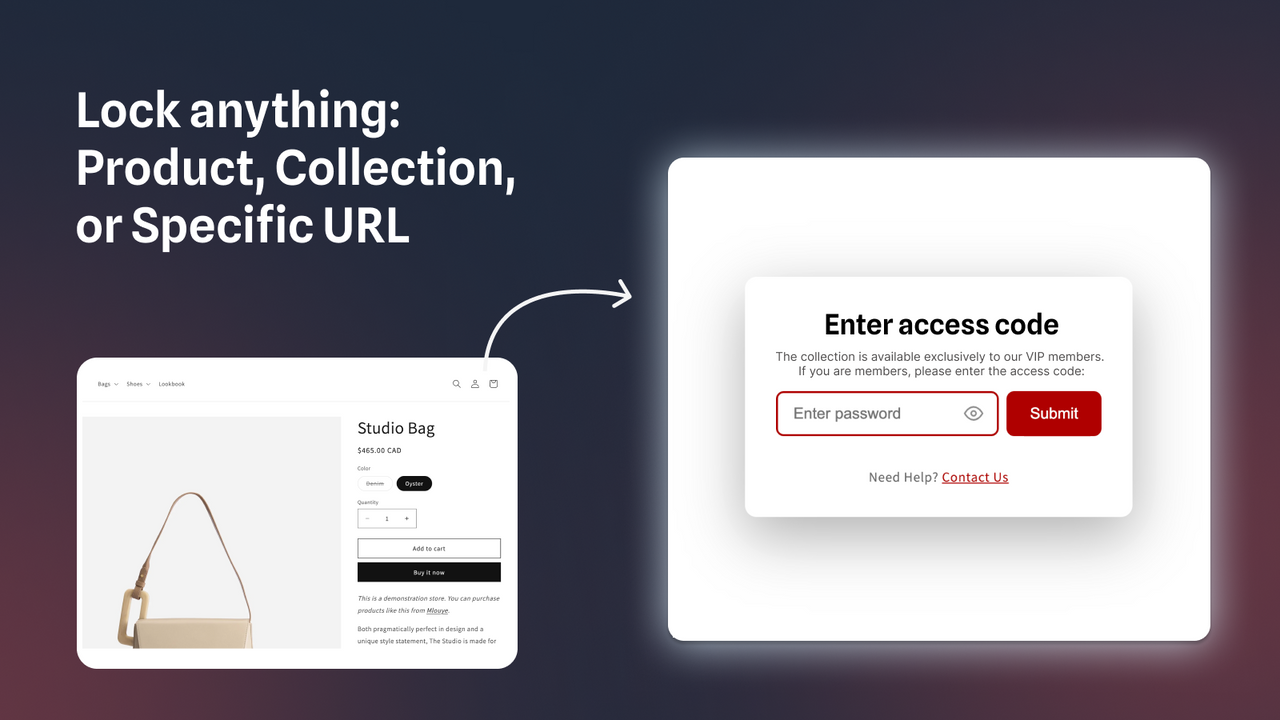
Password Page & Lock Protect Manager enables merchants to restrict store access by locking specific pages rather than the entire store. Ideal for B2B catalogs, VIP drops, or event landing pages, this app allows you to swiftly add password fields to any page with no need for theme edits or code. It operates seamlessly across all themes and devices, supporting access control through customer tags, logins, or passwords. Customized messaging and branding enhance the user experience, making it suitable for businesses looking to manage access to their content effectively.
Pros
- Easy password protection setup for individual pages, enhancing security and access control.
- Custom branding on the lock screen allows for a personalized user experience.
- No theme edits required, making it accessible for all merchants regardless of technical skill.
- Works on all themes and devices, ensuring consistency across the store.
Cons & limitations
- The app requires a monthly subscription for enhanced features, which may affect budget-conscious merchants.
- Customization options may require time to implement effectively, potentially limiting quick setup for some users.
Features
- Lock any page with a password
- Custom branding on lock screen
- Customer tag-based access control
- No code required for setup
- Supports B2B and VIP locks
What you can do with Password Page + Lock Pages
Add Password Protection
Easily lock individual pages by adding a password field with one click, requiring no technical changes.
Customize Lock Screen
Set custom titles, messages, and logos to match your branding on the lock screen.
Manage Access Control
Control access to specific resources by customer tags or logins to enhance exclusivity.
Pricing & plan limits
- 3-day free trials available for paid plans.
- No cap on views or number of locks for all paid plans.
Questions about Password Page + Lock Pages
Can I lock multiple pages at once?
Yes, the app allows you to lock any number of pages easily.
Is there a free version available?
Yes, there is a free plan that allows password protection for one product.
Do I need coding skills to use this app?
No, the app requires no coding skills for setup.
Can I customize the lock screen?
Yes, you can customize the look and message on the lock screen.
What types of businesses benefit from this app?
B2B merchants, event organizers, and VIP sales can effectively use this app to manage access.
Compare pricing plans
Trial: 3-day free trial
| Plan | Monthly | Annual | Limits & charges |
|---|---|---|---|
| Free | Free | Not documented | monthly |
| Essential | USD 5.99 | Not documented | monthly
|
| Pro | USD 11.99 | Not documented | monthly
|
Changes in our research
Differences between saved listing checks. A newly recorded detail can reflect better research rather than a product change.
Checked 5 Nov 2026
- Pricing summary
- Previously: Free plan available. Paid plans start at $5.99/month.Now: Free plan available. Essential: $5.99/month; Pro: $11.99/month
- Listed features
- Previously: Lock any page with a password; Custom branding for lock screen; Manage page access effortlessly; Customer tag-based access control; Support for multiple passwords per lockNow: Lock any page with a password; Custom branding on lock screen; Customer tag-based access control; No code required for setup; Supports B2B and VIP locks
Checked 1 Nov 2026
- Pricing summary
- Previously: Free; Essential: $5.99/month; Pro: $11.99/monthNow: Free plan available. Paid plans start at $5.99/month.
- Listed features
- Previously: Protect any product; Lock based on Customer Tags; Full customization options; Instant Secure Lock; Custom branding on lock pagesNow: Lock any page with a password; Custom branding for lock screen; Manage page access effortlessly; Customer tag-based access control; Support for multiple passwords per lock
- Listed integrations
- Previously: Shopify AdminNow: Not documented in this check
Checked 31 Oct 2026
- Pricing summary
- Previously: Free $0/month; Essential $5.99/month; Pro $11.99/month; 3-day free trial on paid plansNow: Free; Essential: $5.99/month; Pro: $11.99/month
- Listed features
- Previously: Lock pages, products, collections, blogs; Password-protect selected storefront content; Brand lock screens with custom messaging; Restrict access by customer tags or login; Support multiple passwords per lock; Works without theme edits or codeNow: Protect any product; Lock based on Customer Tags; Full customization options; Instant Secure Lock; Custom branding on lock pages