
Is SP Hide Price & Access Control right for your store?
SP Hide Price & Access Control excels at enabling selective price visibility, crucial for B2B relations, but its effectiveness is limited to specific user scenarios requiring a login or password.
- Choose it if
- You need to restrict price visibility for different customer segments effectively.
- Standout capability
- Allows selective price visibility based on customer type, enhancing B2B interactions.
- Consider another approach if
- You require a broader range of public pricing options without login barriers.
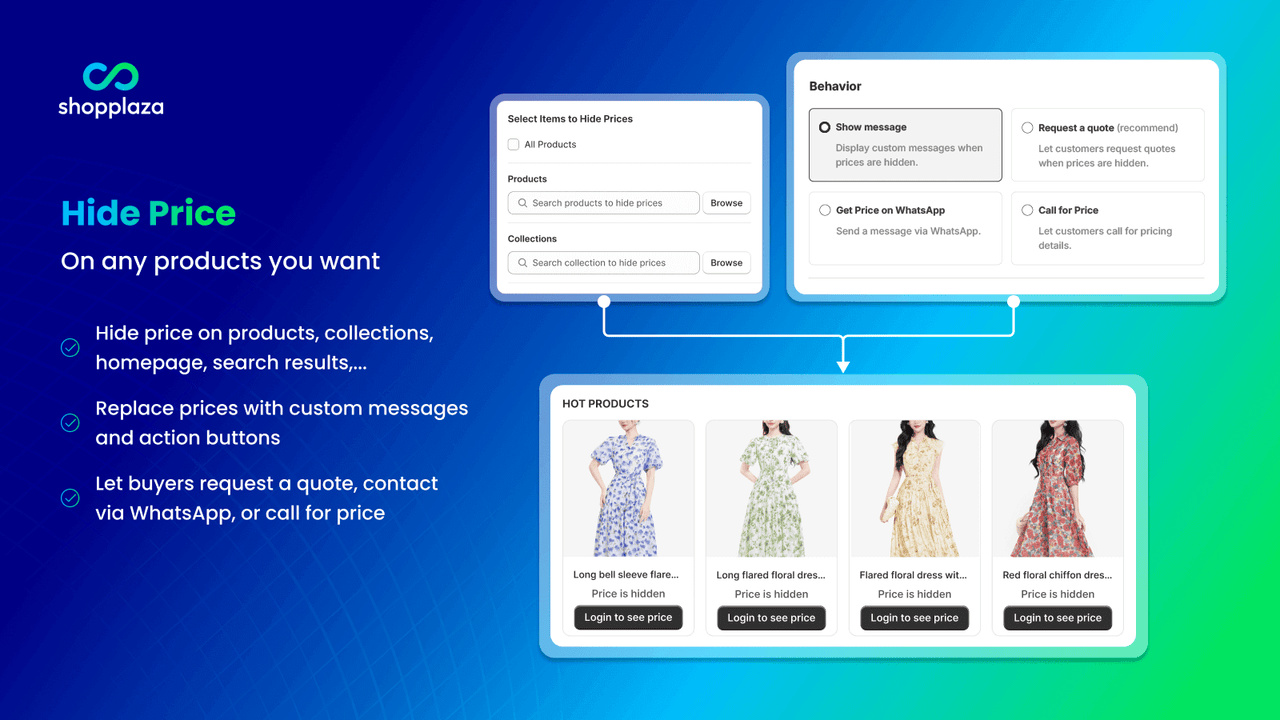
SP Hide Price & Access Control is designed for B2B and wholesale operations, enabling merchants to hide prices, lock pages, and password-protect content. This app allows store owners to set visibility rules based on criteria such as login status, customer tags, and geographic location. When prices are hidden, merchants can replace them with alternative calls to action ensuring a controlled shopping experience. It is ideal for managing exclusive collections or wholesale catalogs without the need for coding skills, making it accessible for a wide range of users. Additionally, it integrates well with various Shopify features, enhancing overall store functionality.
Pros
- Allows selective price visibility based on customer type, enhancing B2B interactions.
- Enables locking pages for exclusive access, protecting sensitive content.
- No coding required, making it user-friendly for all merchants.
- Real-time rule previews help ensure accuracy before implementation.
Cons & limitations
No specific limitations were established in the checked evidence. This does not mean the app has no drawbacks.
Features
- Hide prices on specific pages
- Lock product access by customer
- Password protect content
- Live rule preview
- Hide prices from Google search
- Replace prices with custom CTA
What you can do with SP Hide Price & Access Control
Hide Prices Based on Customer Type
Set rules to hide prices based on customers' login status or tags, ensuring that only specific users can view sensitive information.
Password Protection for Content
Lock certain pages or collections with password protection, allowing only authorized users to access exclusive content.
Real-Time Rule Management
Use the live preview feature to create and test pricing visibility rules before they go live, allowing for adjustments without coding.
Pricing & plan limits
- No charges for using the free plan, unlimited features included.
Setup & day-to-day use
- Add the app to your Shopify store.
- Select the pages, products, or collections you wish to protect.
- Define the rules for hiding prices or locking access.
Supported integrations
- Shopify Admin
Questions about SP Hide Price & Access Control
What can I hide prices from?
You can hide prices from specific pages, products, or Google search results.
Do I need coding skills to use this app?
No, the app is designed to be user-friendly with no coding required.
Can I password protect certain content?
Yes, you can lock pages and collections with a password.
Are there any limits to the free plan?
There are no usage limits, and all features are available on the free plan.
What happens if I want to customize the visibility rules?
You can create custom rules based on login status, location, IP address, and more.
Compare pricing plans
| Plan | Monthly | Annual | Limits & charges |
|---|---|---|---|
| Free Plan | Free | Not documented | Free
|
Changes in our research
Differences between saved listing checks. A newly recorded detail can reflect better research rather than a product change.
Checked 3 Nov 2026
- Listed features
- Previously: Hide prices on products and pages; Password protect content; Set access rules by customer tags; Replace prices with custom buttons; Live rule preview; API supportNow: Hide prices on specific pages; Lock product access by customer; Password protect content; Live rule preview; Hide prices from Google search; Replace prices with custom CTA
- Listed integrations
- Previously: Not previously recordedNow: Shopify Admin
Checked 1 Nov 2026
- Listed features
- Previously: Hide prices on products and pages; Lock content by customer criteria; Password protect collections; Live rule preview; API support for integrationsNow: Hide prices on products and pages; Password protect content; Set access rules by customer tags; Replace prices with custom buttons; Live rule preview; API support
- Listed integrations
- Previously: Shopify AdminNow: Not documented in this check
Checked 30 Oct 2026
- Listed features
- Previously: Hide prices on products and collections; Replace prices with contact prompts; Lock pages by rule and visitor type; Show prices only to approved customers; Detect overlapping rule conflicts; Manual messages for multiple storefront languagesNow: Hide prices on products and pages; Lock content by customer criteria; Password protect collections; Live rule preview; API support for integrations
- Listed integrations
- Previously: Checkout, Shopify Admin, Google Search / rich snippets, Google Shopping / Google Merchant Center, Request a Quote, WhatsAppNow: Shopify Admin